Thursday, December 6, 2012

Decibel scale

Reference : https://ccrma.stanford.edu/~jos/st/Properties_DB_Scales.html
https://ccrma.stanford.edu/~jos/st/Decibels.html 

A decibel (abbreviated dB) is defined as one tenth of a bel.

The bel is an amplitude unit defined for sound as the log (base 10) of the intensity relative to some reference intensity, i.e., 
\begin{displaymath}
\mbox{Amplitude\_in\_bels} = \log_{10}\left(\frac{\mbox{Signal\_Intensity}}{\mbox{Reference\_Intensity}}\right)
\end{displaymath}     


The choice of reference intensity (or power) defines the particular choice of dB scale. Signal intensity, power, and energy are always proportional to the square of the signal amplitude. Thus, we can always translate these energy-related measures into squared amplitude:

\begin{displaymath}
\mbox{Amplitude\_in\_bels} =
\log_{10}\left(\frac{\mbox{Amp...
...ft\vert\mbox{Amplitude}_{\mbox{\small ref}}\right\vert}\right)
\end{displaymath}  

Since there are 10 decibels to a bel, we also have 

\begin{eqnarray*}
\mbox{Amplitude}_{\mbox{\small dB}} &=&
20\log_{10}\left(\fra...
...t(\frac{\mbox{Energy}}{\mbox{Energy}_{\mbox{\small ref}}}\right)
\end{eqnarray*} 
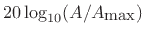
In every kind of dB, a factor of 10 in amplitude increase corresponds to a 20 dB boost (increase by 20 dB):

$\displaystyle 20\log_{10}\left(\frac{10 \cdot A}{A_{\mbox{\small ref}}}\right)
...
...)}_{\mbox{$20$\ dB}} + 20\log_{10}\left(\frac{A}{A_{\mbox{\small ref}}}\right)
$

A function $ f(x)$ which is proportional to $ 1/x$ is said to ``fall off'' (or ``roll off'') at the rate of $ 20$ dB per decade. That is, for every factor of $ 10$ in $ x$ (every ``decade''), the amplitude drops $ 20$ dB.   


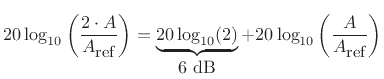
Similarly, a factor of 2 in amplitude gain corresponds to a 6 dB boost:
$\displaystyle 20\log_{10}\left(\frac{2 \cdot A}{A_{\mbox{\small ref}}}\right)
=...
...2)}_{\mbox{$6$\ dB}}
+ 20\log_{10}\left(\frac{A}{A_{\mbox{\small ref}}}\right)
$
and

$\displaystyle 20\log_{10}(2) = 6.0205999\ldots \approx 6 \;$   dB$\displaystyle . \protect$ 
A function $ f(x)$ which is proportional to $ 1/x$ is said to fall off $ 6$ dB per octave. That is, for every factor of $ 2$ in $ x$ (every ``octave''), the amplitude drops close to $ 6$ dB. Thus, 6 dB per octave is the same thing as 20 dB per decade.  


A doubling of power corresponds to a 3 dB boost:
$\displaystyle 10\log_{10}\left(\frac{2 \cdot A^2}{A^2_{\mbox{\small ref}}}\righ...
...{\mbox{$3$\ dB}}
+ 10\log_{10}\left(\frac{A^2}{A^2_{\mbox{\small ref}}}\right)
$
and 

$\displaystyle 10\log_{10}(2) = 3.010\ldots \approx 3\;$dB$\displaystyle . \protect$ 


dB/Octave & dB/Decade

An Octave is where the frequency halves or doubles (by a factor of 2) i.e. 400Hz to 800 Hz 

A Decade is where the frequency increases or decreases by a factor of 10 i.e. 5 Hz to 50 Hz 

Slopes can be defined as dB/Octave or dB/Decade

20dB/decade ≈ 6.0205999132796 dB/octave 

There are 3.3 octaves in one decade .. in other words 

6dB/octave is equivalent to 20 dB/decade
 \text{number of octaves} = \log_2\left(\frac{13}{4}\right) = 1.7          

number of decades \log_{10} (150000/15) = 4


Tuesday, December 4, 2012

Finding maximum possible I/O rate on a disk


You can compute the maximum possible sequential I/O rate.  It's easy:  Look at how many blocks are in one track and how long it takes the disk  to make one revolution (at 7200 RPM) then you will know how many bits  per second fly under the read/write head.  This places an upper bound on the sustained I/O rate.

Generally the XFS file systems gives fastest result.

To make faster read operations, make a separate partition on your drive, possibly at the beginning of the drive (as the beginning of the drive is faster)


Zero copy mechanism

"Zero-copy" describes computer operations in which the CPU does not perform the task of copying data from one memory area to another saving significant processing power and memory. It also saves the time consuming mode switches between user space and kernel space.


Zero-copy protocols are especially important for high-speed networks in which the capacity of a network link approaches or exceeds the CPU's processing capacity. In such a case the CPU spends nearly all of its time copying transferred data, and thus becomes a bottleneck which limits the communication rate to below the link's capacity.

Techniques for creating zero-copy software include the use of DMA-based copying and memory-mapping through an MMU.


Several operating systems support zero-copying of files through specific APIs foe example Windows.
Linux supports zero copy through system calls such as sys/socket.h's sendfile, sendfile64, and splice.

The information above has been taken from Wikipedia.


Thursday, November 29, 2012

Pointers in C++

int *p;

p is a pointer to an integer quantity

int *p[10];

p is a 10 elements array of pointers to integer quantities

int (*p)[10];

p is a pointer to a 10 element integer array

int *p(void);

p is a function that returns pointer to an integer quantity and accepts nothing

int p(char *a);
p is function that accepts an argument which is a pointer to a character  and returns an integer quantity
int *p(char *a);
p is a function which accepts an argument which is a pointer to a character and returns a pointer to an integer quantity

int (*p)(char *a);
p is a pointer to a function which accepts an argument as a pointer to a character and returns an integer quantity
int (*p(char *a))[10];
p is function that accepts argument which is pointer to a character and returns a pointer to a 10 element integer array
int p(char (*a)[]);
p is a function which accepts an argument which is a pointer to a character array and returns an integer quantity

int p(char *a[]);
p is a function which accepts an argument which is an array of pointers to characters and returns an integer quantity
int *p(char a[]);
p is a function which accepts a character array as argument and returns a pointer to an integer quantity
int *p(char (*a)[]);
p is function which accepts an argument which is a pointer to an array of characters and it returns a pointer to an integer quantity
int *p(char *a[]);
p is a function which accepts argument as an array of character pointers and returns a pointer to an integer quantity
int (*p)(char (*a)[]);
p is a pointer to a function which takes an argument which is a pointer to character array and  returns an integer quantity
int *(*p)(char (*a)[]);
p is a pointer to a function which takes argument which is pointer to a character array and returns a pointer to an integer quantity
int *(*p)(char *a[]);
p is a pointer to a function which takes argument which is an array of pointers to characters and returns pointer to an integer quantity
int (*p[10])(void);
p is a 10 element array of pointers to functions which does not take anything as argument and each function returns an integer quantity 

int (*p[10])(char a);
p is 10 element array of pointers to functions; each function accepts a character as argument; and each function returns an integer quantity

int *(*p[10])(char a);
p is a 10 element array of pointers to functions; each function takes a character as argument; and each function returns a pointer to an integer quantity
int *(*p[10])(char *a);
p is a 10 element array of pointers to functions; each function takes a character pointer as argument; and each function returns a pointer to an integer quantity


Saturday, November 24, 2012

Windows Driver Kit (WDK)/Windows Driver Development Kit(Win DDK)

Initially it was known as Windows Driver Development Kit, now it has been superseded by Windows Driver kit i.e. WDK.
As the name suggests it is a framework to develop drivers on Windows Platform.
You can either instal it directly from internet or you can download the file to install in another system
Here is the link

http://msdn.microsoft.com/en-us/library/windows/hardware/gg487428.aspx

I am installing WDK because I need to work on SORA which is a SDK to develop Software Radio applications. It has been developed by Microsoft Research Asia center.

To install WIN DDK you can follow this link 

http://www.tenouk.com/windowsddk/windowsdriverdevelopmentkit.html

Details are here

http://research.microsoft.com/en-us/projects/sora/

Tuesday, October 23, 2012

When to use Genetic Algorithms vs. when to use Neural Networks?

A genetic algorithm (GA) is a search technique used in computing to find exact or approximate solutions to optimization and search problems.A genetic algorithm, despite its sexy name, is for most purposes just an optimisation technique. It primarily boils down to you having a number of variables and wanting to find the best combination of values for these variables. It just borrows techniques from natural evolution to get there.

Neural networks are non-linear statistical data modeling tools. They can be used to model complex relationships between inputs and outputs or to find patterns in data.Neural networks are useful for recognising patterns. They follow a simplistic model of the brain, and by changing a number of weights between them, attempt to predict outputs based on inputs.

If you have a problem where you can quantify the worth of a solution, a genetic algorithm can perform a directed search of the solution space. (E.g. find the shortest route between two points)

When you have a number of items in different classes, a neural network can "learn" to classify items it has not "seen" before. (E.g. face recognition, voice recognition)

Execution times must also be considered. A genetic algorithm takes a long time to find an acceptable solution. A neural network takes a long time to "learn", but then it can almost instantly classify new inputs.